Mostrando entradas con la etiqueta collaboration. Mostrar todas las entradas

jueves, 20 de julio de 2017

Symbaloo: mi banco de herramientas

Hace mucho que no escribo ninguna entrada, así que voy a desempolvar un poquito el blog.

Hoy comparto con vosotros Symbaloo. Es una aplicación muy útil donde podemos agrupar en un mismo escritorio (webmix) enlaces directos a nuestras herramientas y aplicaciones de uso cotidiano. A mí me funciona como recurso donde voy "coleccionando" un sinfín de herramientas TIC que poco a poco voy descubriendo y, en mayor o menor medida, utilizando en/para la clase.

Si seguís este enlace pincháis en los cuadraditos (bloques), os llevarán a la página de la aplicación correspondiente. Algunos de esos bloques son como un pequeño saquito en los que he agrupado varias aplicaciones con contenido y utilidad similares (organización, almacenamiento, edición de imágenes y vídeos...).


Ya veis, son muchísimas, y de contenido bastante variado. Lógicamente, hay unas cuantas que son las que uso de manera habitual, otras de vez en cuando, y la mayoría de manera puntual o para algún trabajo o actividad determinados.

Como os digo, yo utilizo Symbaloo para guardar y organizar enlaces a herramientas TIC, pero podéis también hacer vuestros propios paneles con todo lo necesario, por ejemplo, para realizar un viaje: herramientas para buscar alojamientos, empresas de transporte, rutas, oficinas de turismo, blogs de viajes, etc.

A continuación os dejo un vídeo tutorial que os explica cómo utilizar Symbaloo. Es un poquito largo, pero está muy bien explicado, paso a paso.


¡Animaos a hacer vuestros propios paneles!

viernes, 2 de junio de 2017

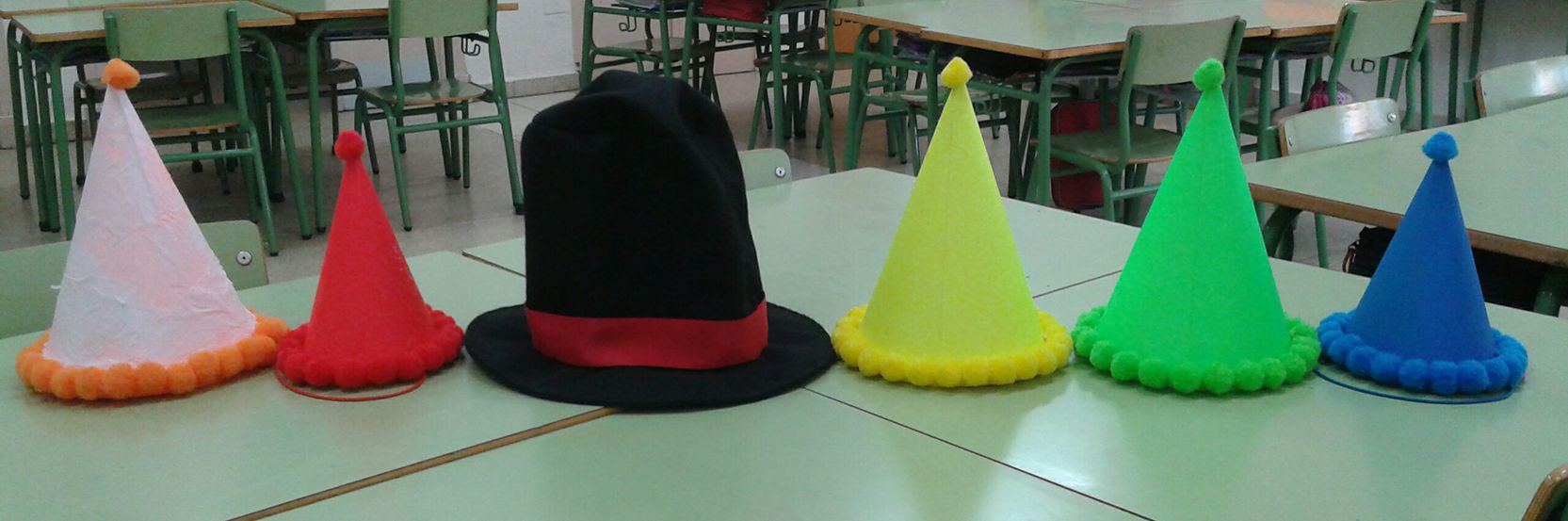
6 sombreros para pensar

Como ya os había comentado, vuelvo con una nueva entrada para hablaros sobre cómo estamos trabajando con los 6 sombreros para pensar en mi aula de 1º de Primaria. La iniciativa surge de un proyecto eTwinning. A partir de aquí, toca ponerse las pilas.


Recopilé los seis sombreros utilizando 5 gorritos de cumpleaños (como veis, el blanco antes era naranja) y una chistera de fieltro, que pertenece a nuestra mascota, Rasi.

En una primera fase, introduje los sombreros en gran grupo, con la intención de que esta estrategia nos sirviera para resolver las discusiones de los niños en algunos recreos. Los alumnos y la profe nos sentamos en el suelo en un círculo grande. Las partes implicadas y los testigos exponen la situación y sus emociones al respecto (sombreros blanco y rojo). Después, todos los niños reflexionan sobre las consecuencias negativas (sombrero negro) o positivas (amarillo) a las que esta situación puede llevar. 

A continuación, con el sombrero verde los alumnos tratan de encontrar una solución (lo más creativa posible) para el problema. En este sentido, tratamos de alejarnos de la idea tradicional de castigo (hacer copias de una frase, castigado en un ringón...), y en su lugar, llegar a acuerdos y tomar decisiones con las que nos sintamos cómodos y que contribuyan a una mejor atmósfera en la clase. Como son los niños quienes proponen las ideas y toman sus propias decisiones, el grado de compromiso con éstas también es mayor. El último sombrero es el azul y lo usamos para evaluar si todo el mundo ha respetado el turno de palabra, si nos hemos hablado con respeto, si las respuestas se ceñían a la pregunta especificada por el sombrero, etc.

Después de varios ensayos, los niños siguen mejorando en sus reflexiones y razonamientos. Además, como vamos hablando entre todos y de manera muy calmada, las partes implicadas en la discusión o pelea de turno, poco a poco también se van relajando. Al final de la actividad, todos nos sentimos mejor.

También hemos usado esta técnica en nuestra hora semanal de tutoría. En esta hora normalmente también tenemos que trabajar en emociones y fomento de la lectura. Por esta razón en uno de los últimos ejercicios combinamos todos los contenidos. A partir de una escena del libro que habíamos estado trabajando ("Nadie quiere jugar conmigo", de Gabriela Keselman) en la que algunos animales se sentían un poco disgustados o enfadados, utilizamos los seis sombreros para pensar para analizar la situación y encontrar una posible solución. Esta vez, trabajamos por equipos, cada uno dedicado a un sombrero. Los portavoces tenían que comunicar las respuestas tomadas por consenso, mientras que el resto de equipos, también podían añadir alguna idea o comentario extra. Este trabajo ha quedado reflejado en un póster que tenemos en la clase. 

Estoy muy orgullosa de cómo lo van manejando los niños poco a poco. Espero que sigamos utilizándolo más veces ¡y me sorprendan con sus maravillosas ideas!

viernes, 26 de mayo de 2017

El año de la revolución eTwinning

Había una vez una joven profe que dio con un curso sobre conciencia europea y eTwinning. Era yo hace unos años. Pensé que era un curso tan interesante y motivador que quería llevarlo a mi aula... pero nunca llegó a ocurrir.

Al principio de este curso volví a la plataforma eTwinning, decidida a hacer algo más que buscar y revisar cosillas. Quería interactuar, participar de todas las maneras posibles. Y no me tomó mucho tiempo: a los dos días ya me había unido a mi primer proyecto eTwinning: Butterflies across Europe.

Mis alumnos estaban verdaderamente entusiasmados; las familias, curiosas y contentas con esta iniciativa, y mis propios compañeros decían que era una actividad bonita, alegre e interesante. Los niños escribieron y leyeron mensajes de sus compañeros europeos, todos en inglés, demostrando su interés y habilidad en este idioma, e incluso usaban el mapa para situar los países de los colegios cuyas cartas recibíamos, relacionándolos con otros personajes y monumentos famosos.

Después de este exitazo, quería continuar la aventura, probar más proyectos, encontrar experiencias emocionantes que llevar a la clase. ¿Lo adivinas? ¡Sí, me uní a otro proyecto! Esta vez el tema eran los 6 sombreros para pensar. Ahora mismo estamos aún trabajando en ello, dándonos cuenta de cómo vamos mejorando y descubriendo que quizá no era tan difícil como inicialmente había pensado. ¡Mis alumnos no paran de sorprenderme!


¡Pronto os contaré más sobre el proyecto de los seis sombreros!

jueves, 25 de mayo de 2017

Project plan for a new eTwinning adventure!

Here is it, finally! The challenge for unit 5 of the MOOC "Open eTwinning" was designing a complete plan for the draft I already shared on a previous entry. I've just finished the task, and I must say it has really put my brain to work, but I'm a lot more satisfied than tired -and that's a lot!

Have a look at this emaze presentation and feel free to leave your comments and suggestions.


Powered by emaze

jueves, 18 de mayo de 2017

Collaboration through e-activities

In unit 4 of the MOOC "Open eTwinning" we are asked to design an ICT activity as a part of the collaborative project we've been working on along the last days, so here I am with my idea of a collaborative e-activity for "The Hungry Globetrotter" (read this entry to know more about the project).

One key point of any project is collaboration. In eTwinning projects this collaboration among students who are so far becomes real thanks to a wide range of digital tools and apps. 

First thing of all, teachers from the three partner schools will need to discuss the organizational aspects, among which the transnational teams will have special importance, since our pupils will have the chance to be in touch and interact. We would also need to consider our groups' ages as well as both languages and ICT skills in order to choose the most suitable language and tools to carry out our project.

Once the teams are formed and pupils have introduced themselves, they will have their first collaborative task. We need each team to decide a healthy menu with three dishes (final result for this concrete activity). This can be done by either having each country suggesting options for only one of the dishes (country 1 suggests first courses and appetizers, country 2 will do main courses and country 3 desserts) or offering one menu with three dishes and then the team chooses which dish from which country they want to work on. The result must be a complete menu with first course from country 1, main course from country 2 and dessert from country 3.  

At first, I thought we could use a forum on the TwinSpace, but considering my 7 year-old children, and the need to have a user and a password, I changed my mind. I think we might use padlet for this task. Its use is very easy, and I find it great for brainstorming. It adapts well to my pupils age and skills. Children could post their suggestions and preferences, and make comments on the other team members' posts too. I will ask students to write the name of their team and country on the title on the post, so as to know which post belongs to which team. They will also have a different part of the board for their messages, so everyone can find their team's posts more easily. You can also see those two fictional teams have followed different strategies to suggest ideas.  
I hope the image helps clarifying my idea (click to see it bigger). 

The great thing is they can even post pictures (or links to pictures and galleries) of the dishes they want to work on, so partners from other countries can have an idea what everything looks like, if they might like it, if they could cook it...

I've also taken on account my group might need some extra help, as they're still beginners at English and might not know some tools. I would consider the idea of inviting a couple of parents to some sessions, so they can provide the groups with extra help if they need to make a photo collage, write some sentences in English... Children would still do things by themselves, but parents and I could split and work as guidance for two teams each. At the same time, families become active part of the eTwinning project and it also helps spread the word. Parents love to be involved in their children's learning process! Parents could complete a simple survey afterwards, to provide feedback about the activity and share any comments and opinions they may have.

The objectives I intend to achieve with this collaborative activity are:
- Get in touch and start interacting with other European students.
- Facilitate the use of ESL in a more natural situation.
- Use of ICT tools (padlet) to collaborate for a common goal.
- Develop a habit and positive attitude towards healthy food/menus.

As to evaluate this activity, when the groups have made their decisions we can check if the menu is healthy enough by looking at the food pyramid: does the menu include the correct portions of each stage of the pyramid? We can actually evaluate the interactions and use of the second language on the Padlet board.

Once each team has decided the 3-dishes menu, they will realize some other activities, like writing the recipes, calculating the cost of the dishes, etc. But that would be at different moments of the project.

Please make your comments and suggestions -they help me improve! 


sábado, 13 de mayo de 2017

Open eTwinning. Unit 2. Conclusions

In unit 2 we were asked to reflect on those aspects of our teaching we need to improve and learn about. Afterwards, we had to search for some projects that could help with it. And well... I was overwhelmed with so many ideas!

First, about those things I need to improve I would say the feeling of being stuck. Sometimes I feel we have too many contents and/or too little time to teach, plus all the extra activities, and other events in the class (some problem happened that morning, children not understanding something and taking more time than expected, etc) put pressure on us, like we're on a hurry. In those moments, it's easy to feel overcome and feeling you lose control of your own work and tasks. 

Another aspect I need to improve is the use of ICT tools more regularly, and relying on children to make an autonomous, good use of them. So far, when I include some technology in the class, it's still me using the keyboard and mouse, leading all the task and giving children a very little responsability. 

About the lack of autonomy, perhaps it's because the age of my group of children (6-7 years old). I know they are digital natives and their knowledge (from playing games and videos on the computer, tablet or smartphone at home) and intuition will make up for the lack of practice of this or that concrete application I want to use in class. But at the same time, they're children and I don't want them to accidentally drop the tablet or find some problem with the settings. To avoid this, so far, we've used only one tablet per team. 

I should also be more regular and include some time for ICT activities along the week, either in Maths lessons, Literacy, Social Science... It's also a bit related to the paragraph above: it's already May and we still need to teach quite a few contents, complete the books, evaluations... So, I need to take a breath, think of this as one more part of the curriculum and make a plan.

Apart from all that, we need to develop and evaluate competencies, however I (we?) still spend quite a lot of time on mechanical tasks and tests to practice and repeat contents, but not applying them on a real situation of childrens' lives. 

What did I learn from the projects?  
I browsed the SNA website and read about a few projects whose titles caught my attention. It was like opening a chest full of creativity and bright ideas. I suppose with all these new treasures and the feedback from the MOOC participants I realized we all have similar doubts, but we do also have the enthusiasm and the will to learn more and improve so...

...What to do when I feel stuck? 
Relax and take a deep breath. You've been through this before. Keep calm and make your plan considering less is more: hurry will make us chaotic and us, teachers can't afford that. Quality before quantity. Checking projects from other teachers will also provide some ideas about activities to make our lessons more effective.

...What ICT tools can I use and when? 
So far, Plickers got a great success and children even ask for it, but it's not one tool in which children have a main role using ICT devices. I have to return to my idea at the beginning of the school year to use Padlet: every child can write a post with their answer to an open question. About the 'when', the last period of the day is a bit more complicated. Children are more tired and sometimes even start to bother other students, so it might be a good moment to use such motivating tools and activities.

These are my top apps for the class

In case we can participante on a eTwinning project, the TwinSpace offers tools for communication among teachers and students too. 

...How can I work on and evaluate competencies? 
Projects are competencial tasks by defnition. Every teacher can create their own project, adapted to the characteristics of their own group, school and city, so the curriculum will be perfectly integrated and the project will be related and adapted to students' real life situations. We can even give children the chance to try actions and experiences they wouldn't normally do... but will surely enjoy, like for example, interviewing someone, participating on a radio program, etc. 

Of course I need to use books and do some mechanical tasks in order to practice contents... but children will learn a lot more with activities that develop their competences, like projects. These will also stimulate their motivation and enthusiasm, which is exactly what neuroscience states: we learn what excites us. 

Possibly, I could pass children a test after the project, to check what they've learnt, but that wouldn't evaluate competencies unless I suggested similar situations to those studied along the project. Plickers, Quizziz or Kahoot could lend a hand too. But it would be easier to use rubrics, learning diaries, self-assessment and peer assessment to evaluate students' competencies along the project. 


lunes, 8 de mayo de 2017

Getting inspired

Today I'm trying to get some ideas in order to re-design and modify my next draft for a collaborative project. Sometimes I have an idea, maybe not very clear on how to be carried out, but I can picture some scenes in my mind about some parts of the work... and when this happens, it's difficult for me to think outside that box. 

So here I am, browsing the net in search for some successful projects, in order to fill the gaps in my own draft. By reading about these amazing experiences I feel there is a great challenge ahead, and I'm just a beginner... 

However they are perfect examples of where collaboration can lead to. There is a lot to learn about international teams, use of varied ICT tools, interaction among schools and really colourful, fascinating final results. Surely we'll find difficulties when working on our own project, but with the help of our partners, and all the information and experiences other teachers share, we can make our own ideas shine! Aaah... if we can learn (and, with our example, make our pupils learn) the importance of collaboration!! 

I leave you to the eTwinning National Support Service website, where you can select projects by age, subjects, school or awards won: Handmade Christmas exchange, La marmita fantástica, El laberinto de las palabras, Our School Anti-Bullying Campaign – Respect, etc.

Gamificación: básicos (muy básicos) y algunas reflexiones

No hace mucho hemos tenido una nueva sesión de formación, en este caso, sobre gamificación . Aparte de recordar algunos conceptos básicos...